
Freelancer Expense Tracker
Log business expenses in seconds and watch spending sort itself by category and month.
View on Etsy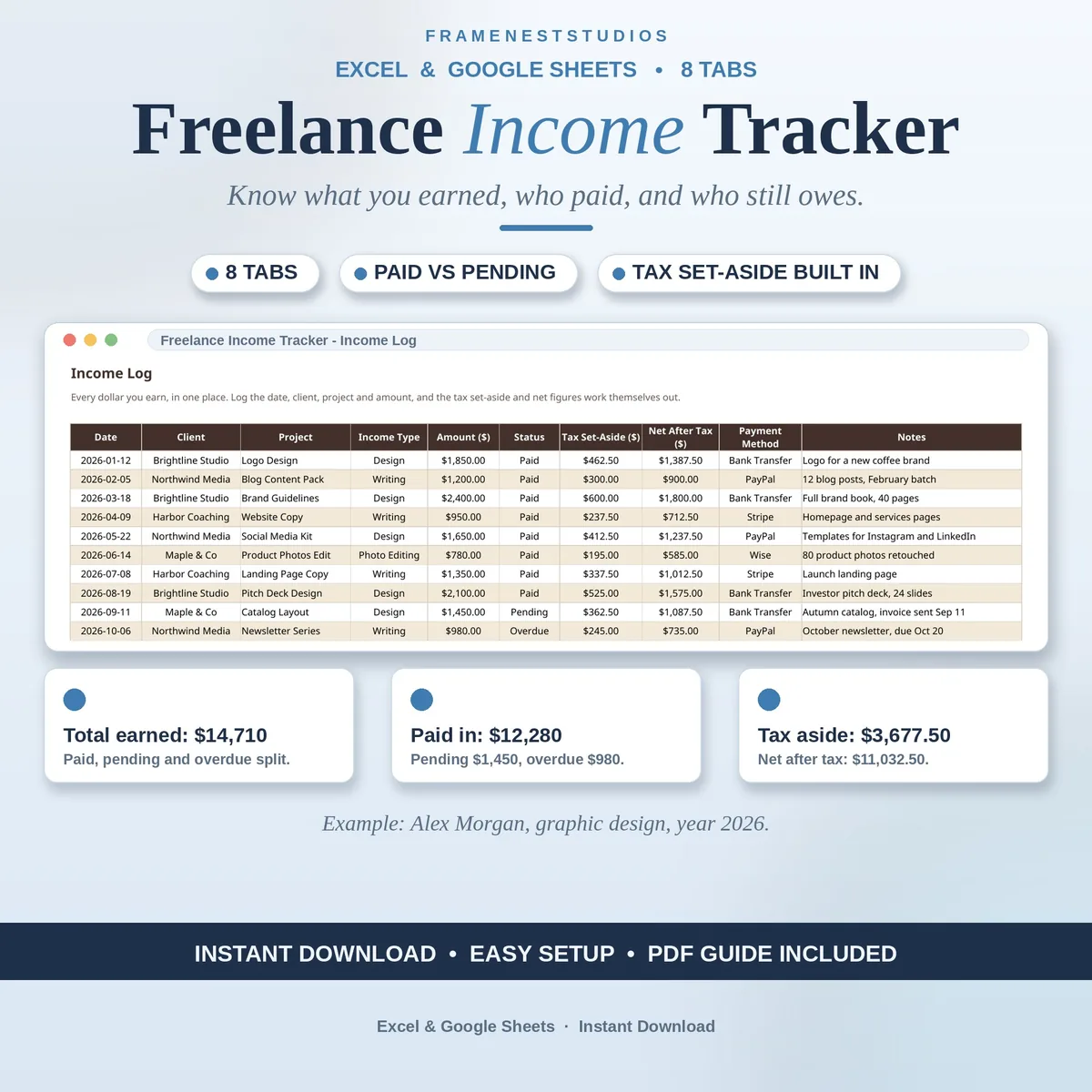
The work is done, the invoice is sent, and then the month blurs into who paid, who is late and what is actually yours. This freelance income tracker sorts income by client, project and month, and sets the tax money aside before you can spend it.
Sale price in our Etsy shop right now. Checkout, payment and instant delivery are handled by Etsy.
Freelance income rarely arrives in a neat monthly salary, which is why it is so easy to lose track of it. This tracker asks for one small entry per payment: date, client, project, type, amount and status. That is all the typing there is. From that single log, paid, pending and overdue stay clearly separate, so the money in your account, the money you are waiting on and the money you need to chase never get mixed into one vague total.
The value builds in the tabs behind the log. Each client gets one row where lifetime billed, paid and outstanding are counted automatically, which answers at a glance who your best client is and who owes you the most. Projects get the same treatment, with the agreed fee beside what has actually been received and what is still outstanding. The monthly summary then lays out the whole year, month by month, including slow months, which are a normal part of freelancing.
Tax is treated as part of the routine rather than a yearly panic. You set your rate once, the example uses 25 percent, and the set-aside and net after tax figures fill themselves in on every row. The dedicated tax tab totals what to save quarter by quarter and records what you have already paid, leaving the amount still to keep aside. The dashboard pulls everything together with your best month, best client and progress against the monthly income goal you set.
The things buyers ask us most.
No. You only type in the plain columns of the Income Log: dates, client and project names, amounts and statuses. Every total, client balance, project balance and tax figure is calculated for you from those entries. If you can fill in a simple table, you can run this tracker, and the Quick Start Guide explains the short routine in order before you log your first real payment.
Yes. The tax rate lives on the Settings and Lists tab, and changing it once updates every income row, the monthly summary and the Tax Set-Aside tab. The example workbook uses 25 percent as a common starting point, but your own rate may differ by country and circumstances. Set the figure that fits you, and check your actual tax position with an accountant before you file.
Mark that row as Overdue on the Income Log. The amount then appears in the overdue totals on the Dashboard and in the Monthly Summary, so you can see at a glance exactly who to follow up with and how much is outstanding. Once the payment arrives, change the status to Paid and the totals update themselves, keeping your paid, pending and overdue figures honest.
Yes. The workbook lives on your own computer and, if you use the Sheets version, in your own Google account. We never see your income, your clients, your projects or your rates, and nothing in the file connects to a bank or sends data anywhere. It is simply a spreadsheet you control, which is exactly how a record of your earnings should be kept.
Three more workbooks from the same shelf.
Log business expenses in seconds and watch spending sort itself by category and month.
View on EtsyTrack content orders from queued to paid, with clients, due dates and earnings in one place.
View on EtsyKeep projects, tasks and deadlines in one calm sheet, with overdue warnings built in.
View on Etsy