
Freelance Income Tracker Spreadsheet
Track freelance income by client and month, with paid, pending, overdue and tax set aside.
View on Etsy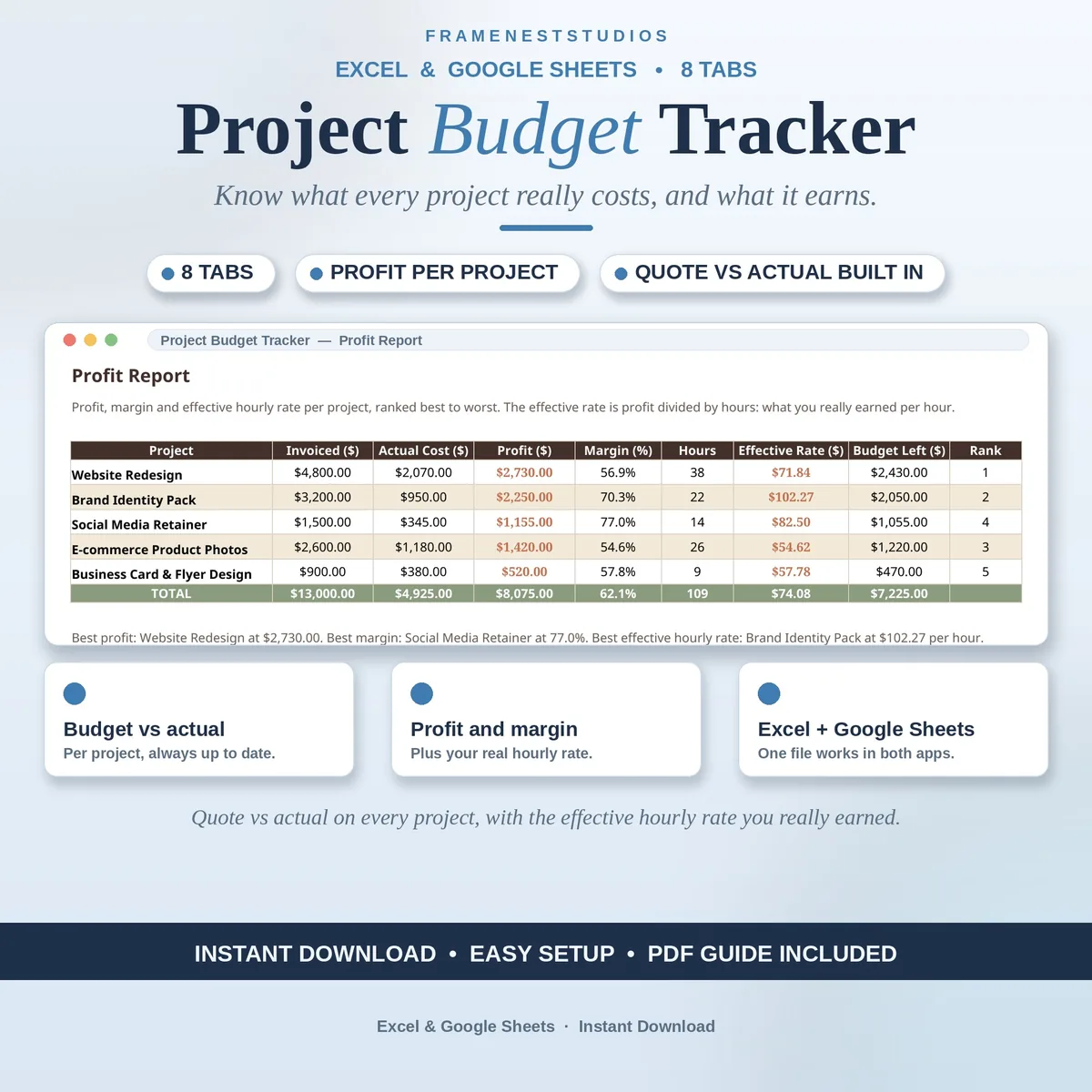
Fixed price work has a sneaky habit: the quote gets agreed, then small costs keep landing until the profit is anyone guess. This project budget tracker follows the money on every job, so you know what each project really made while there is still time to act.
Sale price in our Etsy shop right now. Checkout, payment and instant delivery are handled by Etsy.
Each project starts with a plan, not a hope. On Start Here you set your business name, currency, your standard hourly rate and the contingency percentage you build in. Every project is then listed with its client, status, dates, quoted fee, budget and hours. The Budget Planner splits each budget into materials, labor, other and contingency, and if the planned split runs over budget, the variance shows it before work begins.
As the job runs, real costs land on the Expenses tab, each line tied to a project with its category, amount, payment status and receipt note. Billing lives in the same workbook on the Invoices and Payments tab, so invoiced, paid and outstanding amounts stay visible together. Extra work a client asks for goes on Change Orders, and only approved extras count in the totals, so pending requests never inflate your numbers.
The Profit Report is where the truth lands. It calculates what each job earned, the margin it made and the rate per hour it truly paid once costs come off, and ranks projects best to worst. The dashboard gathers budget used, amounts outstanding, total profit and margin, and flags any project that goes over budget. Designers, developers, photographers, writers and consultants who quote fixed prices will feel at home here.
The things buyers ask us most.
No, and that is deliberate. This workbook tracks money per project: the budget you planned, the costs that actually landed, invoices and payments, and the profit and effective hourly rate at the end. Day to day task management is deliberately minimal here. If you need to follow tasks and clients closely, a project tracker pairs well alongside it.
It is your profit on a project divided by the hours you worked on it, so it shows your genuine hourly earnings once costs come off, frequently less than the rate on your quote. The Profit Report calculates it for every project and ranks them, making it easy to spot which kind of work truly pays you best.
The workbook makes it hard to miss. The dashboard counts over budget projects, the per project table flags the job as over budget, and the budget left figure on the Profit Report turns negative. It also slides down the profit ranking, which makes problem jobs obvious at a glance.
Record each extra on the Change Orders tab, noting its value and whether it is approved. Approved extras are the only ones that feed the totals, while pending ones stay visible without inflating your numbers. An invoiced column prompts you to bill approved extras before you wrap the job up, while the request is still fresh in the client mind.
Three more workbooks from the same shelf.
Track freelance income by client and month, with paid, pending, overdue and tax set aside.
View on EtsyLog business expenses in seconds and watch spending sort itself by category and month.
View on EtsyTrack content orders from queued to paid, with clients, due dates and earnings in one place.
View on Etsy