
VAT Tracker Spreadsheet
Sales, purchases and the nine box VAT return, worked out as you log each line.
View on Etsy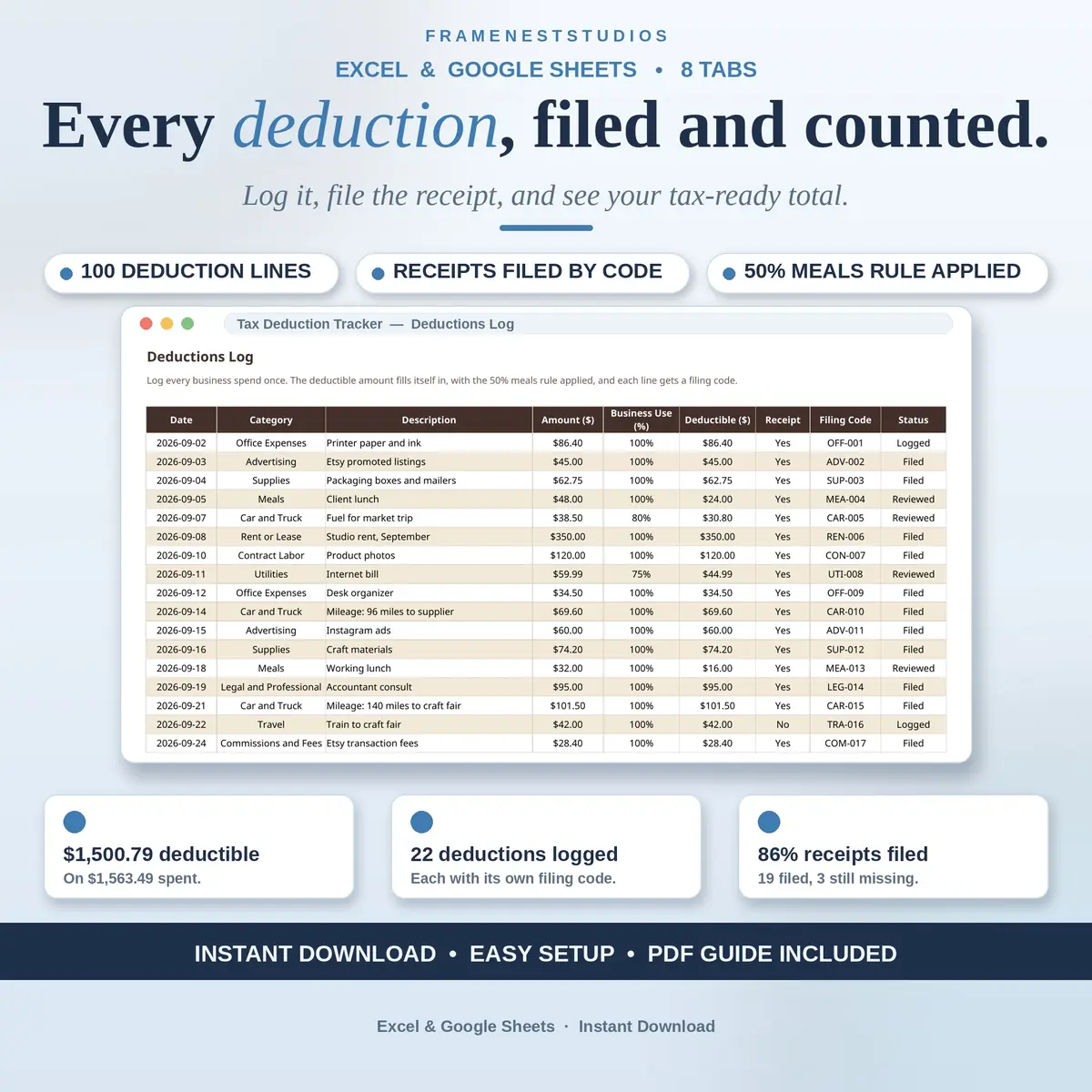
April is much calmer when your deductions were logged the day you spent the money. This tax deduction tracker spreadsheet keeps every business expense and its receipt together all year, grouped by Schedule C category, with a tax-ready summary waiting at the end.
Sale price in our Etsy shop right now. Checkout, payment and instant delivery are handled by Etsy.
This tracker does one job and does it properly: deductions and receipts. It does not track your income and it does not estimate your tax bill, on purpose. What it does is keep every business deduction logged from the day you spend the money, with its receipt filed under the same code, so that when your accountant asks for totals, the answer is a page you hand over rather than a weekend of digging.
The Deductions Log holds 100 lines, one per business spend, with the Schedule C category, amount and business use percent, and the deductible amount fills itself in. Meals get the 50 percent rule applied automatically, and mileage rows are priced at the rate you set, 72.5 cents a mile for 2026 unless you change it. Every line earns a filing code from its category and row number, and the Receipts tab files each receipt under that same code, flagging any receipt with no matching deduction.
Before you spend, the Buy-It-Or-Not tab lets you test a planned purchase: item, category, price and business use, and it shows the deductible amount with a plain verdict, likely deductible, partly deductible or not deductible. Behind the scenes, the Categories tab totals everything across all 15 Schedule C categories, Quarterly Totals does the same by quarter, and the Tax-Ready Summary pulls the whole year onto one page for your accountant.
The things buyers ask us most.
Every deduction line gets a code built from its category and row number, so the first office expense becomes OFF-001. You file the paper or digital receipt under that code, in a folder or a box, and enter the same code on the Receipts tab with where it lives. The Linked column then confirms the code matches a real deduction line, and mismatches stand out.
Meals are 50 percent deductible, and the workbook applies that rule for you. Log the full amount of the meal along with its category and business use, and the deductible amount is worked out at half automatically. A 48 dollar client lunch, for example, counts as 24 dollars deductible without you doing any maths at the table or later.
Mileage rows on the Deductions Log are priced at the rate set on Start Here, which starts at the 2026 standard rate of 72.5 cents a mile and can be changed if your rate differs. You note the miles in the description and enter the amount as miles times your rate. The Tax-Ready Summary then totals your business miles and the mileage deduction for you.
No. This tracker totals your deductions and keeps your receipts filed, and that is the whole of its job. It does not follow your income, estimate taxes or work out quarterly payments. If you need the income side as well, the shop's Freelance Income Tracker covers it, and your accountant can advise on what to pay and when.
Three more workbooks from the same shelf.
Sales, purchases and the nine box VAT return, worked out as you log each line.
View on EtsyIncome, sales tax, deductions and quarterly estimates in one calm year-round file.
View on Etsy